A brochure is read in a sequence, not as one flat sheet. Its fold determines what the reader sees first, how the message opens and where the call to action belongs. Choose the format before finalizing artwork for brochure and flyer printing, then approve both the flat file and the folded result.
Choose the fold around the message
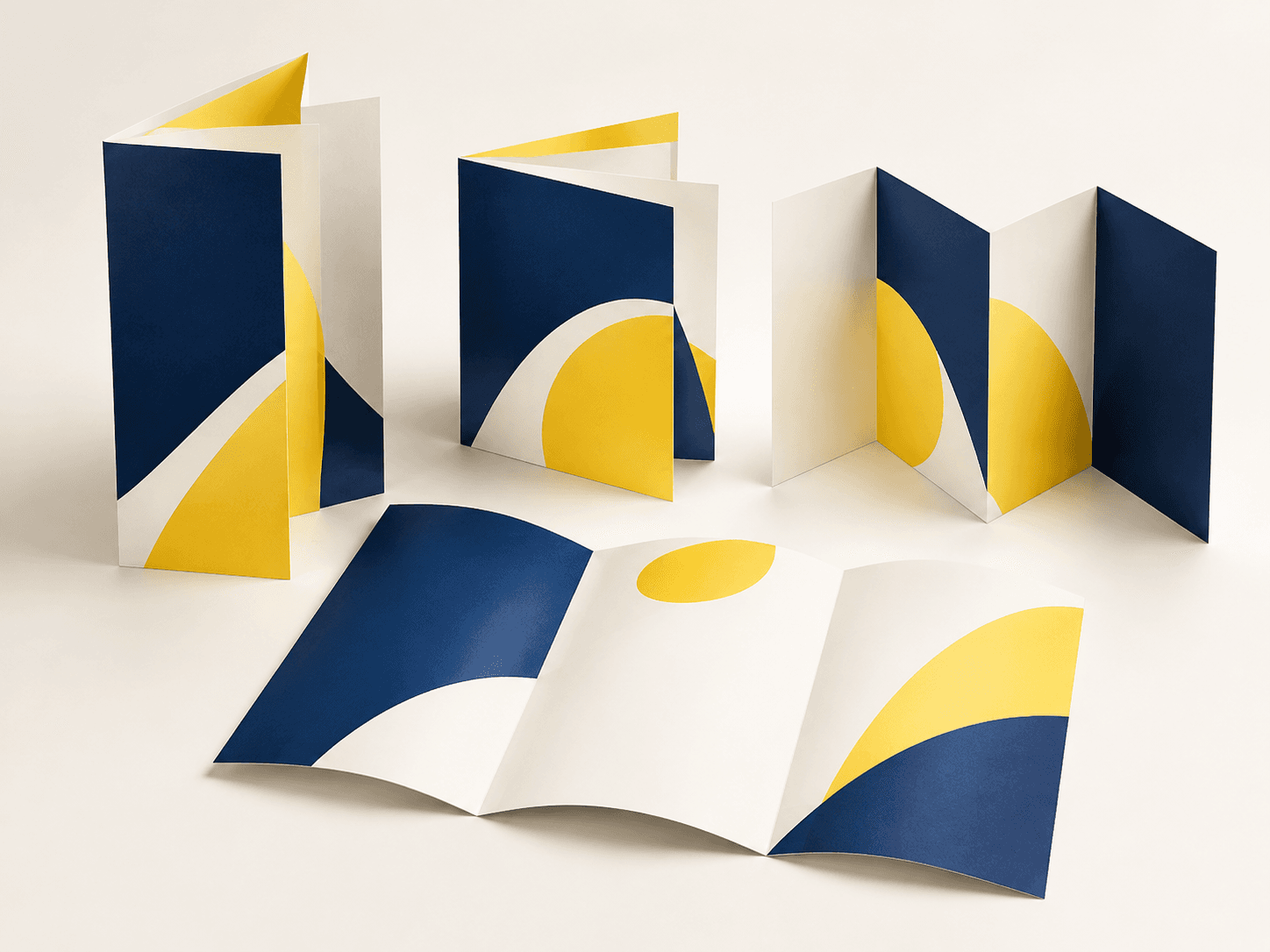
A bi-fold brochure provides a straightforward cover, interior spread and back panel. A tri-fold brochure can reveal content in stages, while a Z-fold brochure can support a continuous sequence across panels. A gate-fold format uses opening panels for a different reveal. Select the structure around the amount of information and how the piece will be handed out or mailed.
If the content needs a single clear offer or specification sheet, compare a flyer or product sell sheet instead. Additional panels should serve the reading experience, not just make the product appear more substantial.
Confirm flat size, folded size and panel widths
List the flat and finished dimensions separately and identify the fold direction. Do not divide every three-panel sheet into equal widths without checking the construction. A panel that folds inside another may need a different width; the printer’s template should define the allowance for the chosen paper and fold.
Make a simple physical dummy, mark the front and back, and number the panels in reading order. Use it to check the artwork layout with the printer. This is especially useful when a design contains maps, multi-step instructions or an image that crosses a fold.
Choose paper and finishing for the folded piece
Discuss paper weight, surface, grain and any coating together with the fold. A heavier sheet may need a different approach from a lightweight handout. Dark coverage or a coated surface across a fold should be assessed on a representative sample where the appearance matters.
Sappi’s folding and creasing guidance treats stock and converting choices as connected decisions. Ask whether the proposed job requires creasing and how the fold will be checked. Do not assume that adding lamination alone resolves cracking or that a sample on another stock predicts the finished result.
Prepare artwork at the approved dimensions
Use the final template and preserve the fold positions. Extend backgrounds to the required bleed and keep text, logos and scan codes clear of trim and fold boundaries. Adobe’s guidance explains how bleed extends artwork beyond the finished edge; confirm the amount and PDF export settings with your printer rather than relying on a default setting alone.
Keep fold and trim instructions distinct from the printed graphics. Ask which technical marks should be included, and make sure a guide intended for production does not accidentally print as part of the design. Review the exported PDF, not only the design application’s working file.
Approve content and physical behavior
- Confirm the cover, back panel and opening sequence against the numbered dummy.
- Check contact details, dates, URLs and every version of the artwork.
- Review critical colors and surface finishes through the agreed proof method.
- Check that the folded sample closes correctly and important copy remains readable.
- Confirm packing orientation, quantity per bundle and protection for finished edges.
A digital proof is useful for content and positioning, but it cannot establish how a finished paper stock feels or folds. Agree which physical checks are needed through the proofing and production workflow. If stock, coating or dimensions change, ask which approvals need to be repeated.
Prevent common brochure problems
If a panel is hidden in the wrong place, compare the artwork with the fold dummy before adjusting the press file. If an image crosses a fold awkwardly, confirm both the intended crop and fold position. If several language versions are involved, label every file and specify quantities by version to prevent a correct design from being printed in the wrong mix.
Brochure printing FAQ
Are tri-fold and Z-fold templates interchangeable?
No. Their fold sequence and panel requirements can differ. Use a template approved for the exact fold and paper specification.
Should every brochure use the same paper weight?
No. Consider the number of folds, distribution method, desired feel and surface finish. Ask for samples when the physical result is a purchasing criterion.
What affects the quote besides quantity?
Flat size, stock, number of versions, print coverage, finishing, folds, proof requirements, packing and delivery all form part of the specification. Compare quotes on the same basis.
Request a brochure quote
Send the intended fold, flat and finished dimensions, quantity by version, paper preference, artwork, finishing and required delivery date. Request a brochure quote and identify any open decisions before layout is finalized.
Technical references
Adobe: setting a print bleed; Sappi: folding and creasing guidance. Job-specific templates and proof instructions take precedence over general examples.